
Why Choosing the Best Computer Software for Graphic Design Changes Everything
The best computer software for graphic design in 2026 comes down to what you need to create — here’s a quick look at the top options:
| Software | Best For | Price (2026) |
|---|---|---|
| Adobe Photoshop | Photo editing, raster graphics | $22.99/month |
| Adobe Illustrator | Vector art, logos, scalable design | Part of CC plans |
| Adobe InDesign | Layouts, print, publishing | Part of CC plans |
| CorelDRAW Graphics Suite | All-in-one vector + photo | ~$22.42/month |
| Affinity Designer | Vector design, free alternative | Free |
| Canva | Beginners, templates, social media | Free tier available |
| Figma | UI/UX, real-time collaboration | Free tier available |
| GIMP | Free photo editing, open-source | Free |
| Inkscape | Free vector illustration | Free |
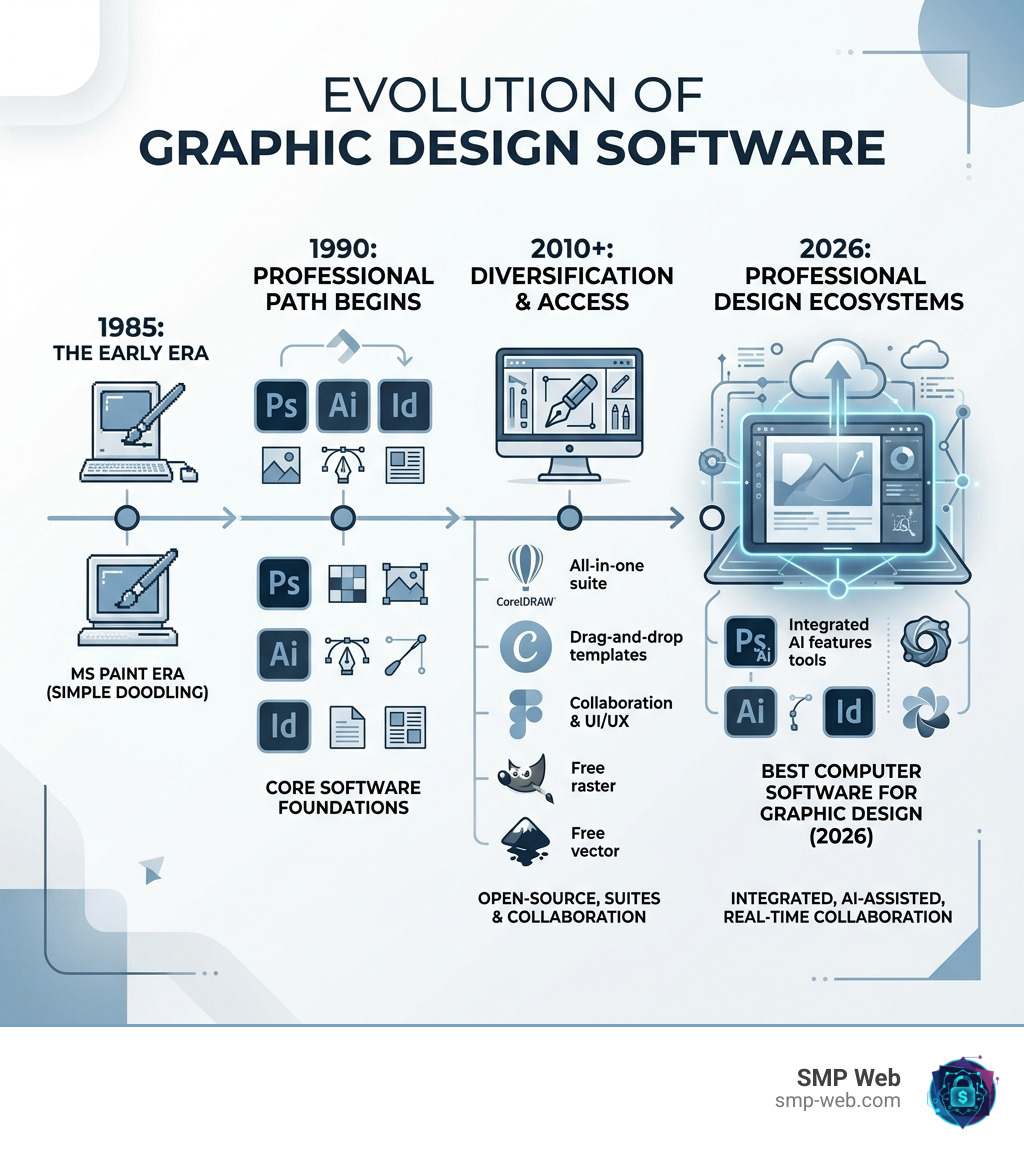
MS Paint was fine for doodling in the early 2000s. But if you’re trying to create a logo, design a website, or build a brand in 2026 — it’s not going to cut it.
Here’s the thing: graphic design is how ideas become visible. From the brochure that makes you book a vacation, to the app interface you use every day, visual design shapes how we experience the world. And the software you use shapes what’s possible.
Over 90% of creative professionals worldwide use Adobe Photoshop alone. That tells you how seriously the industry takes its tools.
Whether you’re a small business owner building your own brand, a hobbyist who wants to level up, or someone just tired of fighting with outdated tools — picking the right software is the first real step.
I’m Faisal Shahzad, a technology writer at SMP Web covering software, digital tools, and emerging tech trends — including the best computer software for graphic design for creators at every skill level. Let’s break down exactly which tools are worth your time (and money) in 2026.
Understanding the Basics: Raster vs. Vector Software
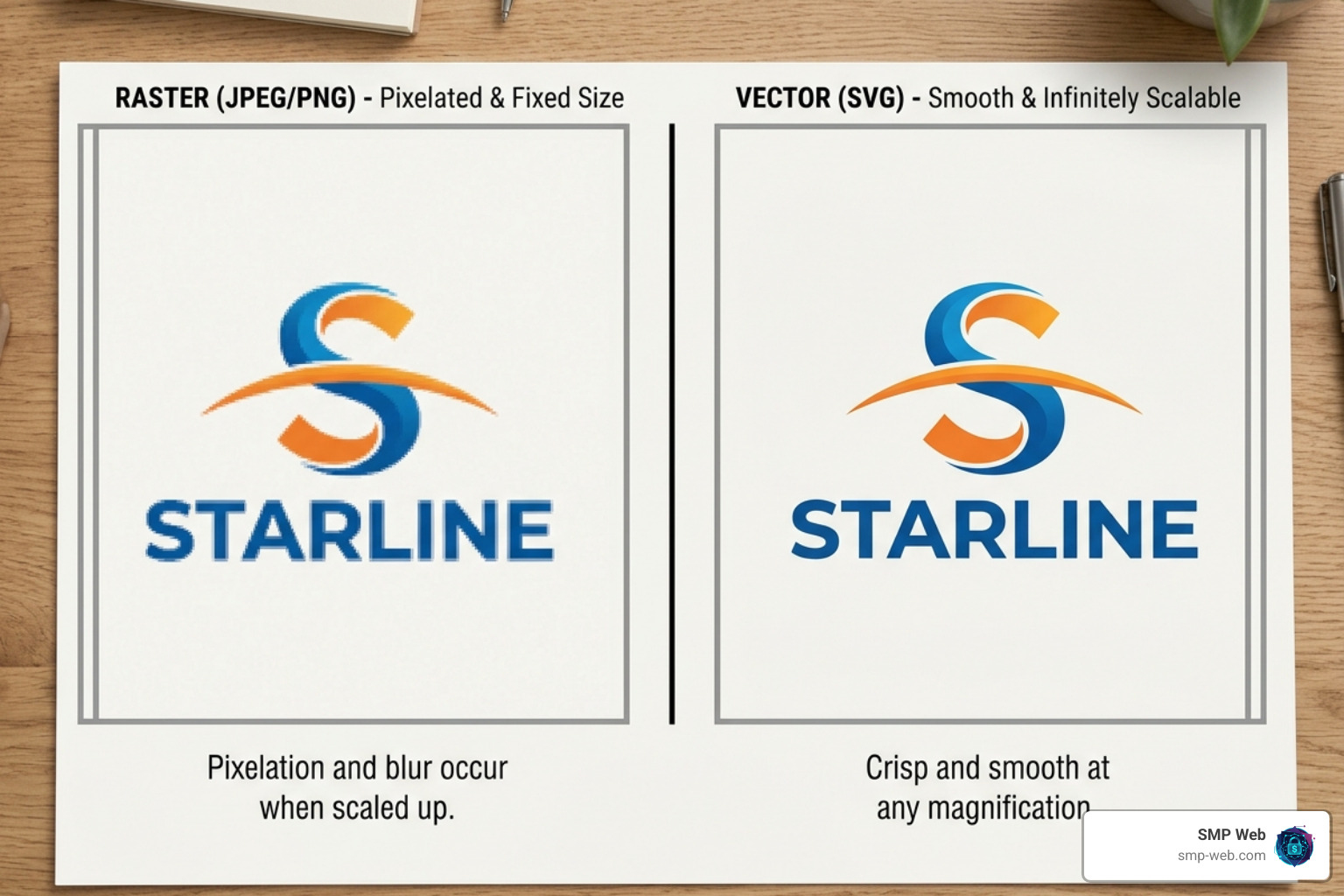
Before we dive into the specific programs, we need to clear up a fundamental distinction that trips up many beginners: the difference between raster and vector graphics. If you choose the wrong type of software for your project, you might end up with a blurry mess when it comes time to print.
Bitmaps and Pixels (Raster)
Raster images, also known as bitmaps, are composed of thousands of tiny colored squares called pixels. Think of a digital photograph; when you zoom in far enough, you start to see those little blocks. This makes raster software like Adobe Photoshop ideal for complex color blending and photo manipulation. However, there is a catch: raster images are resolution-dependent. If you try to enlarge a small photo to fit a billboard, it will become “pixelated” and blurry.
Mathematical Equations and Scalability (Vector)
Vector graphics are a completely different beast. Instead of pixels, they use mathematical equations to define points, lines, and curves. Because they are based on math rather than a fixed grid of squares, they offer infinite scalability.
As we’ve seen in the industry, a vector logo created in a program like Adobe Illustrator can be scaled from the size of a postage stamp to the size of a roadside billboard without losing a single ounce of quality. This resolution independence is why vectors are the gold standard for logos, icons, and typography. When working with these elements, choosing the right Top Color Palettes in Graphic Design is crucial for maintaining brand consistency across all scales.
The Industry Titans: Best Computer Software for Graphic Design for Professionals
When we talk about the professional landscape in 2026, the conversation usually starts and ends with the “Adobe Trinity.” However, competitors like CorelDRAW have made significant strides, especially with AI integration.
Adobe Photoshop: The King of Raster
Adobe Photoshop remains the undisputed go-to for over 90% of creative professionals. In 2026, it is no longer just a photo editor; it is a comprehensive design engine. Its strengths lie in layer manipulation and pixel-perfect editing.
Recent updates have introduced “Harmonize” features and Topaz Labs upscaling integrations, allowing designers to blend objects into new backgrounds with matched lighting automatically. Whether you are retouching a portrait or creating a complex digital collage, Photoshop’s non-destructive adjustment layers give you total control.
Adobe Illustrator: The Vector Standard
If Photoshop is the king of pixels, Adobe Illustrator is the master of the line. It is the industry-standard vector design app, and as of April 2026, it is faster than ever.
We’ve seen reports that the most frequently used effects in Illustrator now perform up to 5x faster than in previous versions. This speed is vital when you are using the Shape Builder or Pen tools to craft intricate brand identities. For anyone serious about a career in design, Illustrator is a non-negotiable part of the toolkit.
Adobe InDesign: The Layout Legend
While Illustrator handles the logos and Photoshop handles the photos, InDesign brings them together. It is the premier software for layout design—think magazines, brochures, eBooks, and multi-page PDFs. It handles typography with a level of precision that other programs simply can’t match, making it essential for print and digital publishing.
CorelDRAW Graphics Suite: The Versatile Alternative
For those looking for a powerful alternative to Adobe, CorelDRAW Graphics Suite offers an impressive all-in-one solution. In 2026, CorelDRAW has leaned heavily into AI, offering an “AI Generate” docker that creates images from text prompts and one-click background removal.
It is particularly popular in industries like signage, apparel design, and large-format printing. Many professionals appreciate its one-time purchase option, which contrasts with Adobe’s strictly subscription-based model.
Professional Software Comparison Table (2026)
| Feature | Adobe Creative Cloud | CorelDRAW Suite | Affinity Suite |
|---|---|---|---|
| Primary Model | Subscription | Subscription or Buy | Free (via Canva) |
| AI Integration | Firefly (Advanced) | Generative Docker | Canva AI Studio |
| Learning Curve | Steep | Moderate | Moderate |
| Platform | Win/Mac/iPad | Win/Mac/Web | Win/Mac/iPad |
Affordable and Free Alternatives to the Subscription Model
Let’s be honest: not everyone wants to pay a monthly “rent” for their software. If you are a student, a hobbyist, or a small business owner in Karachi looking to save on overhead, there are incredible alternatives that won’t cost you a paisa.
The Affinity Revolution (Now Free!)
Perhaps the biggest news in the design world recently is that Affinity Designer and Affinity Photo are now free for everyone through their integration with Canva.
Affinity Designer is a direct competitor to Illustrator, offering a smooth, responsive experience for vector art. It allows you to switch between vector and raster workspaces within the same app—a feature even Adobe hasn’t quite mastered. For those who want professional-grade tools without the professional-grade price tag, Affinity is currently the best computer software for graphic design in the “value” category.
GIMP: The Open-Source Powerhouse
GIMP (GNU Image Manipulation Program) has been the primary free alternative to Photoshop for decades. While its interface can be a bit clunky compared to premium tools, it is incredibly powerful for photo retouching, digital art, and UI mockups. Because it is open-source, it’s a favorite for Linux users and those who love to customize their software experience.
Inkscape: Vector Freedom
If you need a free alternative to Illustrator, Inkscape is your best bet. It is an open-source vector graphics editor that uses the SVG (Scalable Vector Graphics) format as its native file type. It’s particularly excellent for stylus users and illustrators who want a high degree of control over paths and nodes without spending money on a subscription. You can find more tools like this in our Category: Graphics section.
Specialized Tools for Modern Digital Workflows
The landscape of graphic design has expanded. In 2026, we aren’t just designing for paper; we are designing for screens, voices, and even AI-driven environments.
UI/UX Design and Figma
If your goal is to design websites or mobile apps, Figma is the gold standard. Its biggest strength is real-time collaboration. Multiple designers can work on the same file simultaneously—think of it as the “Google Docs” of design. It’s browser-based, meaning it works on almost any computer, and it makes the “handoff” to web developers incredibly smooth.
Sketch: The Mac Professional’s Choice
For a long time, Sketch was the king of UI/UX design. While it remains Mac-only, it is still highly regarded for its simplicity and focused toolset. It excels at prototyping and creating complex design systems, though it lacks the photo-editing depth of Photoshop.
The Rise of Generative AI
We cannot talk about the best computer software for graphic design in 2026 without mentioning AI. Tools like Adobe Firefly have revolutionized the workflow. We’ve moved from manually “cloning” out a background to using generative fill to reimagine entire scenes.
Designers are now using AI to generate base vectors, which they then refine by hand. This is part of AI’s Transformative Path in Art Evolution, where the tool becomes a partner in the creative process. If you’re curious about how these pixels turn into masterpieces, check out our guide on AI from Pixels to Art Headliners.
Choosing the Best Computer Software for Graphic Design for Beginners
If you are just starting, the professional suites can feel like trying to fly a 747 when you just learned to ride a bike.
- Canva: This is the ultimate “gateway” tool. With thousands of templates and a simple drag-and-drop interface, it’s perfect for social media graphics, flyers, and simple presentations. It’s widely considered the Best Graphic Design Software for Beginners.
- Adobe Express: Adobe’s answer to Canva. It provides a simplified way to access Adobe’s powerful asset library and fonts without the steep learning curve of Photoshop.
- Education for Teens: For younger creators, starting with accessible tools is key. Whether they are interested in social media or Discover the Dynamic World of Caricature Fashion, these beginner tools provide the perfect sandbox to learn the principles of layout and color.
The Best Computer Software for Graphic Design in UI/UX and Prototyping
When you’re building a digital product, you need more than just a pretty picture. You need a prototype. Modern software for UI/UX focuses on:
- Wireframing: Creating the “skeleton” of an app.
- Artboards: Managing dozens of different screen sizes (from iPhone to 8K monitors) in a single file.
- Component Libraries: Creating a button once and reusing it 1,000 times across a project.
- Responsive Design: Ensuring the layout “snaps” to fit different devices automatically.
Figma and Adobe XD lead this space, providing cross-platform support that allows designers in Karachi to collaborate with developers anywhere in the world seamlessly.
Frequently Asked Questions about Graphic Design Tools
What is the best software for professional drawing and illustration?
Adobe Illustrator is the industry standard for vector-based illustration because it allows for infinite scaling. However, if you prefer a more “painterly” feel with raster brushes, Adobe Fresco or Procreate (on iPad) are fantastic choices that mimic real-world art materials.
Are there free alternatives to Adobe’s subscription model?
Yes! As of 2026, the Affinity Suite (Designer, Photo, Publisher) is free via Canva integration. For open-source fans, GIMP (raster) and Inkscape (vector) remain powerful, zero-cost options that are updated regularly by the community.
What are the system requirements for 2026 design software?
Most modern design software requires a minimum of 16GB of RAM (though 32GB is recommended for 4K video or complex 3D work). You’ll also need a dedicated GPU (Graphics Processing Unit) to handle the AI-accelerated features in Adobe and CorelDRAW. For Mac users, Apple Silicon (M1/M2/M3/M4 chips) is highly optimized for these tasks.
Conclusion
Finding the best computer software for graphic design isn’t about finding the most expensive program; it’s about finding the tool that fits your workflow. If you’re a professional, the Adobe Creative Cloud remains the gold standard for a reason—its integration and power are unmatched.
However, we are living in a golden age of accessibility. Between the free professional tools from Affinity and the beginner-friendly templates in Canva, there has never been a better time to stop using MS Paint and start creating something real.
At SMP Web, we believe in making technology accessible. Whether you’re navigating Category: Graphics or looking for the latest PC security guides, we’re here to help you master the digital landscape. The future of design is collaborative, AI-enhanced, and more creative than ever—make sure you have the right tools to be a part of it.
