

What Is the DivX Codec and How Do You Get It on Windows 10?
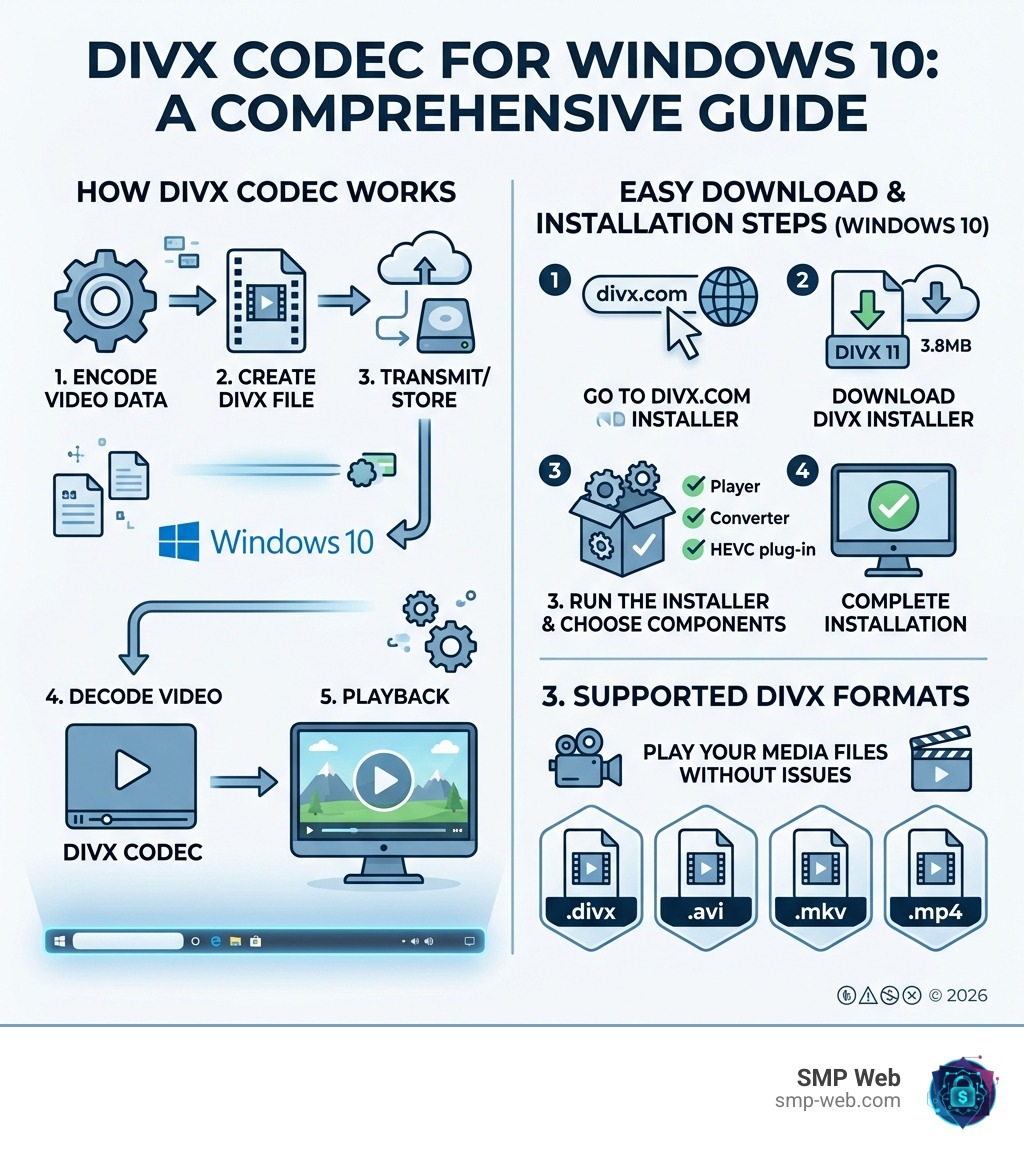
If you need a divx codec download windows 10, here is the quick answer:
- Go to the official DivX website at divx.com
- Download DivX 11 (the latest supported version — file size: 3.8MB)
- Run the installer and select your components (Player, Converter, HEVC plug-in)
- Follow the on-screen steps to complete installation
- Open any
.avi,.divx,.mkv, or.mp4file to start playing
Note: DivX 10 is no longer supported. Always download from the official DivX site to avoid malware risks.
DivX has been one of the most recognized names in digital video for over two decades. With more than 1.5 billion software downloads and 2 billion licensed playback devices worldwide, it helped shape how people watch video on their computers and TVs.
But Windows 10 does not include native support for the DivX format out of the box. That means older .avi files, .divx videos, and even newer HEVC/H.265 content may simply refuse to play — or play without audio — until you install the right codec.
That is where this guide comes in.
I’m Faisal Shahzad, a technology writer at SMP Web covering software, codecs, and Windows troubleshooting — including everything you need to know for a smooth divx codec download windows 10 experience. Let’s walk through exactly what you need, step by step.
Why You Need the DivX Codec Download for Windows 10
In digital media, a “codec” (short for compressor-decompressor) is the secret sauce that allows high-quality video to fit into small file sizes. The DivX codec is built on the MPEG-4 Based standard, which revolutionized the early 2000s by allowing users to rip entire DVDs into files small enough to fit on a single CD without losing significant quality.
Even in April 2026, many of us still have vast libraries of legacy media. If you have files ending in .avi or the proprietary .divx extension, Windows 10 often struggles to decode them natively. By securing a divx codec download windows 10, you ensure that your system can handle the Divx Video Format properly.
Beyond just “old” files, the modern DivX 11 suite is a powerhouse for current standards. It provides essential support for MKV files and high-efficiency video coding (HEVC/H.265). This is crucial for playing 4K resolution content. Without the specific DivX components, your 4K videos might stutter or fail to load entirely. For a deeper dive into the technical roots of this technology, check out our What is DivX? The Complete Guide.
Compatibility with DivX Codec Download Windows 10 Versions
One common point of confusion is which version to install. As of 2026, DivX 11 is the gold standard. While many older guides mention DivX 10.8.6, it is important to note that DivX 10 – EOL (End of Life) status means it no longer receives security updates or technical support.
The good news is that the latest Divx Codec is remarkably backward compatible. When you install the modern software, it still carries the instructions needed to play legacy formats like:
- DIV3: The original “hacked” version of Microsoft’s MPEG-4.
- DIV4: An early iteration of the official DivX codec.
- DX50: The FourCC code for DivX 5.0, which was a major milestone in video quality.
Whether you are on Windows 10 or have recently moved to Windows 11, the DivX 11 installer is designed to work seamlessly across these environments. You can find the necessary files at the official Download Codecs, Players and Software repository.
Choosing Between Free and Pro for Your DivX Codec Download Windows 10
When you initiate your divx codec download windows 10, you’ll be presented with two main paths: the Free version and DivX Pro.
For the average user who just wants to watch a movie, the free version is excellent. It includes the player, the web player, and a basic version of the converter. However, if you are a power user, DivX Pro offers several “quality of life” upgrades:
- Ad-Free Experience: No interruptions while you navigate your library.
- Cloud Connect: Sync your videos directly from Google Drive or Dropbox.
- MPEG-2 Plug-in: Essential if you are looking into Divx Dvd Backup or playing non-encrypted DVD files.
- Advanced Audio: Support for DTS-HD and Dolby assets.
When comparing Divx Vs Mp4, DivX is often used as the “container” or the compression method, and the Pro version gives you more granular control over how those files are created. According to official DivX 11 Software is Available to Download! announcements, the Pro version has been consolidated into a single, lower-priced package to make these features more accessible.
Step-by-Step Guide: How to Install DivX on Windows 10
Installing a codec isn’t as scary as it sounds. Gone are the days of manually dragging .dll files into system folders. We want to make sure you get it right the first time to avoid any “file not found” errors later.
Before you start, always ensure you are using the Free DivX Video Software official link. Third-party sites often bundle “bloatware” or toolbars that you definitely don’t want on your PC.
The Installation Steps:
- Download: Visit the official site and click the “Free Download” button.
- Launch: Locate the
DivXInstaller.exein your downloads folder and double-click it. - Language Selection: Choose your preferred language (the software supports 10 languages, including English, French, and German).
- License Agreement: Read and accept the terms (we know, everyone “reads” them!).
- Component Selection: This is the most important part. Ensure “DivX Codec Pack” and “DivX Player” are checked.
- Finish: Let the installer run. It will register the Digital Video Codec with your Windows 10 system automatically.
For more visual learners, our Divx Tutorial provides a deeper dive into the Divx Downloading process.
Installation Process and Component Selection for DivX Codec Download Windows 10
During the installation of your divx codec download windows 10, you will see a list of components. Here is a breakdown of what they do so you can customize your setup:
| Component | What it Does | Why You Need It |
|---|---|---|
| DivX Player | The primary media player. | Optimized for Divx Player features like 360° video. |
| DivX Converter | Changes file formats. | Great for turning AVI into MP4 for your phone. |
| Media Server | Streams from PC to TV. | Casts to Chromecast, Roku, or Smart TVs. |
| HEVC Plug-in | High-Efficiency Video Coding. | Mandatory for smooth 4K video playback. |
If you are looking for just the codec without the full player suite, some users prefer the Download DivX 11 Free – HEVC Video Codec standalone option, though we generally recommend the full official installer for the best stability on Windows 10.
Advanced Features: 4K, HEVC, and 360° Playback
One of the coolest things about the modern DivX 11 update is its focus on high-end visuals. We aren’t just talking about grainy 700MB movie rips anymore. DivX now supports Divx Compression levels that allow for stunning 4K clarity.
The “DivX Optimized” feature is a game-changer. It automatically detects the hardware in your Windows 10 machine and uses hardware acceleration to offload the heavy lifting from your CPU to your Graphics Card (GPU). This means you can watch 4K HEVC videos without your laptop fans sounding like a jet engine.
Furthermore, the Software Update: Immersive 360° Playback! allows you to watch VR-style content directly on your desktop. You can click and drag to look around inside the video, which is perfect for skydiving videos or immersive nature documentaries.
Converting and Casting Media
Once you have your divx codec download windows 10 set up, you aren’t just limited to watching videos on your monitor. The built-in Media Server allows for “on-the-fly” transcoding.
Imagine you have a high-quality MKV file that your Smart TV doesn’t understand. Instead of spending hours using a Divx Converter to change the format, the DivX Media Server can “translate” the video as it streams it to your Chromecast or Roku.
This is also helpful for Divx Burning projects where you might want to create a physical backup of your digital media. The converter offers presets for various devices, making it a “one-click” solution for moving videos to an iPhone or tablet.
Troubleshooting Common DivX Issues on Windows 10
Even with the best software, technology can be a bit finicky. Here are the most common issues we see at SMP Web and how to fix them:
- No Audio: This often happens if the video uses an AC3 or DTS track that wasn’t included in the free codec pack. Upgrading to Pro or installing a separate AC3 filter usually solves this.
- Video Freezing: If your video stops but the audio keeps going, you might need “DivX AntiFreeze.” This small utility prevents the player from getting “stuck” on a corrupted frame.
- Codec Not Recognized: If Windows Media Player still won’t play the file after installation, use the GSpot Codec Information Appliance.
GSpot is a classic tool that tells you exactly which codec a file requires. If it says “Codec Not Installed,” you may need to re-run the DivX installer and ensure the “Codec Pack” is selected. For more specific OS issues, check out our tag/windows and tag/divx sections for community-driven fixes.
Frequently Asked Questions about DivX for Windows
Is DivX 10 still supported for Windows 10 users?
No. As mentioned earlier, DivX 10 has reached its End of Life (EOL). While it might still work, we strongly recommend that you Play DivX files. Free video software to play, convert and cast video. by upgrading to DivX 11. This ensures you have the latest security patches and support for modern formats like 4K HEVC.
Can I play DivX files in Windows Media Player?
Yes! When you perform a divx codec download windows 10, the installer adds “DirectShow” filters to your system. These filters act as a bridge, allowing older players like Windows Media Player or Media Player Classic to understand the DivX format. If you’re still curious about the “how” behind this, read our guide on Tag/What Is Divx.
What are the system requirements for 4K DivX playback?
To enjoy smooth 4K playback on Windows 10, we recommend:
- CPU: Intel Core i5 or equivalent (higher for software decoding).
- GPU: A graphics card that supports hardware-accelerated HEVC decoding (NVIDIA GTX 960 or newer, Intel HD Graphics 4400 or newer).
- RAM: 4GB minimum, though 8GB is preferred for 4K.
- OS: Windows 7, 8, 10, or 11.
Conclusion
Getting a divx codec download windows 10 is more than just a way to play old movies; it’s about unlocking a versatile media suite that handles everything from legacy AVI files to cutting-edge 360° 4K content. At SMP Web, we believe that technology should be accessible to everyone, and having the right codecs is the first step toward a frustration-free media experience.
Whether you’re converting family videos for your phone or streaming a movie to your TV, the DivX 11 suite remains a powerful ally in 2026. For more tech explainers and deep dives into digital media, be sure to visit our What is DivX? The Complete Guide to This Digital Video Codec and explore the rest of our software guides. Happy watching!
